want your own website or blog?

I have written before on how to start a website or blog, but things change so when a friend recently asked I thought I would go through it again here. Please add your questions to the comments. Hopefully I can walk thrpough this with Dawn and even share her site with you when she gets it up and running. Probably one of the most important services you need it good hosting. You can compare hosting to the power that keeps your site up and running. Similar to the way your power company keeps all the local merchants in your town open. You can have the biggest best superstore in town but when the power goes out nobody can shop or visit. So good hosting is a MUST. I use Hostgator and they have always been VERY reliable.  You can click on the link below to start your own account. One thing you definitely DO NOT want is to host on any site that gives you free hosting, there are plenty to be found and they will rob your potential visitors blind. They will implant their own (sometimes untasteful) ads on your site and track all of your visitors to send them spam. DO NOT, did I say do not? Do NOT use them. If you are going to go to the trouble of building your own site, do it right.

my new Droid Razr – 5 stars here!

I was ready for a phone upgrade a couple months ago, but was really dragging my feet deciding what I wanted. I like the Droids but the last one I got never got good service here, it was one of the first HTC Eris Droids, the phone was probably fine but it is hard to get any cell service here. We have always found that the Motorolas do better. So I was looking at the ones by Motorola and we were thinking back which phones have worked best for us. Mind you I am the only one in the family who acts civilized with a phone, the rest of the folks here drop them from scaffolding, swim horses through water with the phone in their pockets, get bucked off horses with them, and so on, but even I ended up putting one in the washer once. So believe me when we say we know which phones to get and not to get. Some hold up, some don’t.

Anyway we were saying how we loved the old Motorola Razr better than anything. Well my taking my time paid off because I ended up with the new Droid Razr which I love! Now normally it would take me forever to learn how to use the thing but  hey that is the best part about having a 16 yr old daughter. You hand her the phone for about 15 minutes and she not only changes your screen to something pretty but then can teach you every available thing that phone can do. I think mine can even cook dinner if I tell it what I want :) .  So Yay!! I have a new phone! And I pretty much know how to use it. And if you are local I know a wonderful Verizon guy that would love to help you. We actually went in the store this time to upgrade. His name is David Webster and  I would be happy to share his business number if you ask.

Now I just need to find an app to be able to post here, if I remember right there is a wordpress app for Droids.  Hmm, would love to hear what other apps y’all recommend.

disclaimer ~ as always all opinions are my own and this time  I did NOT get paid on this, you get my 5 star review just because I like the phone, I do get something though if you use my link above :)

laptop on the treadmill

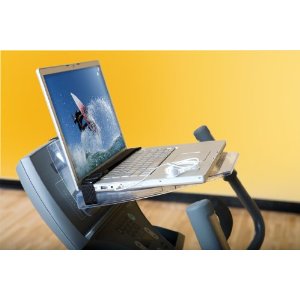
Well with all of this snow my girls have been baking and baking and baking, until they ran out of sugar. Thank you Lord :) . Actually I don’t have a hard time politely saying, “no thank you” to the sweets. The other thing they have been doing is working out. We have a home gym but all the equipment is in an unheated room that is also used for other things. So rather than move all the other things away from the woodstove out there they brought one of the treadmills inside and are also doing calisthenics. They are too funny, push-ups, then bake a cake. Jog then eat a cake. Jumping jacks then pancakes. It is never ending around here, but I am glad that they understand the economics of calories, lol. They all have such a great metabolism that they really don’t need to exercise to look great but they really also want to stay in shape even though they aren’t doing as much outside. Even though I have had to wait my turn on the treadmill and even though I have been extra busy I still want my turn. But since I am short on time I rigged my own version of the surfshelf  like in the picture. It worked, but only good enough to get by until my real one arrives. Yes I am ordering one today I hope. I love to spend time on the treadmill but must be entertained, or doing something productive. So I get walking and study whatever tech thing I need to study all at the same time. Works for me. Why have I been so busy … ? Well I am blessed to be working with a well known homeschool publisher. So I have been uploading book after book into their bookstore. I will be making a big announcement about that soon. :)

tech tip – connecting a laptop to a TV

41CR2wDeBCL._SL500_AA300_ Well here we are in winter. The days are short and it is a good time to watch movies, if you find good ones :) . They are few and far between but it is possible. We choose not to have TV reception by way of cable or satellite but we do like to watch DVD’s. We recently figured out how to watch some of the movies we would choose from Netflix online. The problem though was me and my daughters all huddled in the same chair to watch it on the laptop. That was funny. Anyway I finally put things together to be able to watch it on the big screen. Now if you don’t have the same components it might not work the same but it is worth a try to take a look here. I have an HP dv600 laptop and a Toshiba HDTV flatscreen TV we bought last year. Both have a place for an S-video cable. It looks like you would need a 7 pin cable but all I could find was a 4 pin and that works fine. We bought one at Walmart for $6, or you can click here to get one from Amazon. S-Video Cable 12 ft. Gold Plated I simply connected one end to each. Then on the laptop you push the fn button (located bottom left corner next to the ctrl button)  and he F4 button (one of your function buttons on the top row). Your screen will go black. It will now be visible on the TV but you my have to choose one of the input options with your remote. If you push the fn and F4 buttons one more time you will be able to see it on the laptop and the TV at the same time.  When your movie is ready just click where it says “full screen” and the computer browser look will change and you will have a nice big picture. When you are done you will need to disconnect your cable and push the fn and F4 buttons one more time. We still needed to use computer speakers for sound. Have fun! Here are links for a couple different cables if the s video does not work with your set up.Be sure to check what length you need.

VGA Adapter to TV S-Video RCA Out Cable for PC Video

S-Video to 3-RCA Composite AV Cable for Laptop PC TV

tech tip – restoring Firefox toolbars

41CR2wDeBCL._SL500_AA300_Last night we finally hooked up the laptop to the TV to watch something on Netflix. I will share in another tip how we did that, but in the midst of trying to get it right I hid the toolbars on my browser. I hid the menu bar, navigation toolbar and bookmarks toolbar. That part was easy, just right click on the blank space at the top near the link for help. Then uncheck the toolbars you want to hide and you get a bigger viewing area. But the problem was restoring them. I assumed I would right click up there again and get the option to restore them. I assumed wrong.

I did find the answer though and this is it. While your browser is open use your “alt” key that will restore your menu bar. Then you can right click next to the help link and recheck the toolbars you want to restore. Hope that helps Smile .

LinkWithin Related Stories Widget for Blogs